Promote user content from SQL in Logic App workflows with Transco
Integration scenarios often need to 'promote' or 'enrich' messages/data from external stored systems. Codit is a long-term implementer of something called 'Transco', which was originally a Microsoft BizTalk component. Now, modern Azure Logic Apps integration benefits from this behavior.
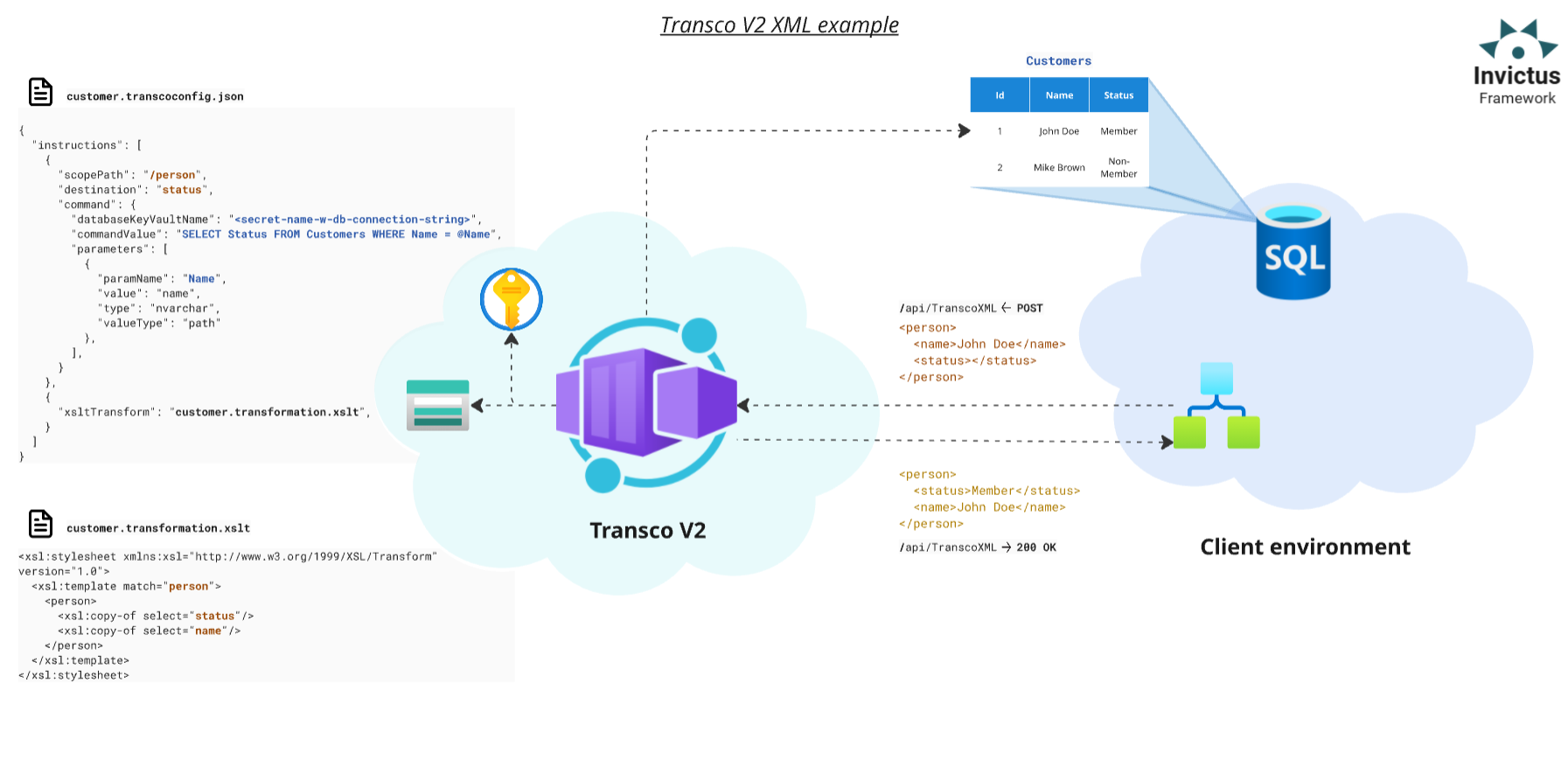
Invictus provides a Transco component to promote properties from a database, by using the content or context to create the SQL query which executes against the specified table. Transco can also perform transformations on XML content by simply specifying the XSLT file from storage (Transco supports XSLT 1.0 syntax.).
Available endpoints
-
/api/TranscoXML: uses XML content and a Transco configuration file to list the instructions necessary to promote values from an SQL database or to transform the content via an XSLT file. -
/api/TranscoJson: uses JSON content and a Transco configuration file to list the instructions necessary to promote values from an SQL database. The component can't perform transformations on JSON content. -
/api/MatrixBasicPromote: accepts a simple list of parameters and promotes them to theContextin the response.
- XML/JSON
- Matrix basic promote
The Transco request requires following values:
- XML/JSON content in BASE 64 format;
- Context as key-value pair list;
- Name of Transco config file in Azure Blob Storage.
Full request body JSON example
// POST /api/TranscoXML
// POST /api/TranscoJson
{
  "Content": "PD94bWwgdmVyc2lvbj0iMS4wIiBlbmNvZGluZz0idXRmLTE2Ij8+PHJvb3Q+PG5hbWUgc3RhdHVzPSJNZW1iZXIiPkpvaG4gRG9lPC9uYW1lPjwvcm9vdD4=",
  "Context": {
    "CustomerActive": "true"
  },
  "TranscoConfig": "docs_config.json"
}
Full response body JSON example
// 200 OK <- /api/TranscoXML
// 200 OK <- /api/TranscoJson
{
  "Content": "PD94bWwgdmVyc2lvbj0iMS4wIiBlbmNvZGluZz0idXRmLTE2Ij8+PE1lbWJlcj5Kb2huIERvZTwvTWVtYmVyPg==",
  "Context": {
    "CustomerActive": "true"
  },
  "TranscoConfig": "docs_config.json"
}
Transco config file
The component requires a JSON Transco configuration file to describe the instructions to perform. Execution of instructions happens in the order in which they appear.
The request should specifies the name of the configuration file.
- SQL Commands
- XML Transformation
The Transco component can execute SQL commands to promote properties from a specified database and table. The database connection happens via either a raw connection string or the name of an Azure Key Vault secret holding the connection string.
You can populate the parameters of the SQL query from 3 sources:
- XML/JSON request content via XPath/JPath
- Request context
- Fixed value
The component will insert the SQL query result at the specified destination XPath or JPath. For XPaths ending at an attribute (ex: /persons/person/@name), it inserts the value in that attribute. Otherwise, it insert the value in the inner text of the XML node.
- The
scopePathoption sets the affected nodes to apply the command. - Always provide a connection to the SQL database (via a connection string in plain text or in an Azure Key Vault secret).
- Denote parameters in the SQL query with an
@symbol. You may give parameters a name or indexed with a number.SELECT CustomerStatus FROM dbo.Customers WHERE CustomerName = @Name AND Active = @Active*
-- or
SELECT CustomerStatus FROM dbo.Customers WHERE CustomerName = @1 AND Active = @2*
The Transco component can execute XSLT transformations on XML content. You must specify the name of the XSLT file in the storage account.
Specify required assemblies and dependencies used by the transformation, while the respective DLL files are to be in the storage account.
This instruction is only available when calling the /TranscoXML endpoint.
{
  "xsltTransform": [Name of XSLT file],
  "extensions": [
    {
      "namespace": [Assembly namespace],
      "assemblyName": [Assembly name],
      "className": [Assembly class name],
      "dependencies": [
        "[DLL dependency file name]",
        "[DLL dependency file name]"
      ]
    }
  ]
}
Save all required files in the Azure Storage Account and in a Blob Storage container with the name: Transcov2configstore (Invictus automatically creates this container):
/Configsfolder with Transco config files/XSLTsfolder with transformation files/Assembliesfolder with assembly and dependency DLL files
Full Transco config file specification
{
  "instructions": [
    {
      "scopePath": [XPath/JPath of content scope],
      "namespaces": [
        {
          "namespace": [XML Namespace],
          "prefix": [XML Namespace prefix]
        }
      ],
      "destination": [XPath/JPath of the results destination, or Context key if promoteToContext = true],
      "promoteToContext": [If true query result is saved to Context at key destination],
      "command": {
        "databaseConnectionString":[Raw connection string to DB],
         "databaseKeyVaultName": [Name of DB connection string secret in Key Vault],
         "commandValue": [SQL query to be executed],
         "isMandatory": [If true, will throw error when result is null],
        "columnName": [Obtain value from specified column if query returns multiple fields. If empty, value from first column is obtained],
         "defaultValue": [Default value of result],
         "parameters": [
           {
            "paramName": [Name of param in query],
             "value": [Type dependent. XPath or JPath if valueType = "path"],
             "type": [SQL DB type. See: https://learn.microsoft.com/en-us/dotnet/api/system.data.sqldbtype],
             "valueType": ["path" or "fixedValue" or "context"]
          },
          {
            "paramName": [Name of param in query],
            "value": [Type dependent. Any string value if valueType = "fixedValue"],
            "type": [SQL DB type. See: https://learn.microsoft.com/en-us/dotnet/api/system.data.sqldbtype],
            "valueType": ["path" or "fixedValue" or "context"]
          },
          {
            "paramName": [Name of param in query],
            "value": [Type dependent. Key to value in context if valueType = "context"],
            "type": [SQL DB type. See: https://learn.microsoft.com/en-us/dotnet/api/system.data.sqldbtype],
            "valueType": ["path" or "fixedValue" or "context"]
          }
        ],
        "cache": {
          "useCaching": [If true, query result is cached],
          "cachingTimeout": [Cache timeout timespan]
        }
      }
    },
    {
      "xsltTransform": [Name of XSLT file],
      "extensions": [
        {
          "namespace": [Assembly namespace],
           "assemblyName": [Assembly name],
           "className": [Assembly class name],
           "dependencies": [
             "[DLL dependency file name]",
             "[DLL dependency file name]"
           ]
        }
      ]
    }
  ],
  "options": {
    "configCache": {
      "useCaching": [If true, config file is cached],
      "cachingTimeout": [Cache timeout timespan]
    },
    "indentResult": [If true, Transco results will be formatted and indented]
  }
 }
The basic promote is a simple way of promoting values to the context. This version accept a simple list of parameters and promotes them to the Context. The component only transfers found values to the response.
Transco XML/JSON operations also support promotion of values to the context.
- Set the option
promoteToContext=truein the Transco configuration file. - Set the option
destinationto the key of the desired destination in the context. The SQL operation will now save the result to the context.
| Supported request parameter | type |
|---|---|
KeyValueCollection | Key-Value collection (each pair is individually promoted) |
Flow | string |
Domain | string |
Service | string |
Action | string |
Version | string |
Sender | string |
ApplicationName | string |
Milestone | string |
ConversationId | string |
CorrelationId | string |
BatchId | string |
Data1 | string |
Data2 | string |
Data3 | string |
Full request body JSON example
// POST /api/api/MatrixBasicPromote
{
 "Content":  "ew0KICAiQ291bnRyeUNvZGUiOiAiQkUiLA0KICAiTW9uZXkiOiAgeyAiQW1vdW50IjogIDUwLCAiQ3VycmVuY3kiOiAgIkdCUCIgIH0NCn0NCg==",
 "Context":  {
 "x-conversationId":  "29500405-d7cf-4877-a72b-a3288cff9dc0",
 "x-correlationId":  "fc13d345-ebd7-44f2-89a9-4371258c0a08",
 "x-batchId":  "975f7ea4-6247-431b-afb6-6d27fb47516f",
 "x-applicationName":  "InvoiceApp",
 "filter":  "endtoendintegrationtests"
 },
 "KeyValueCollection":  {
  "w":  3,
  "l":  10.2,
  "h":  1,
  "t":  200,
 },
 "Flow":  "fl1",
 "Domain":  "do",
 "Service":  "sr1",
 "Action":  "Ac",
 "Version":  "Vs",
 "Sender":  "Snd",
 "ApplicationName":  "Snd",
 "Milestone":  "2018",
 "ConversationId":  "29500405-d7cf-4877-a72b-a3288cff9dc0",
 "CorrelationId":  "29500405-d7cf-4877-a72b-a3288cff9dc0",
 "BatchId":  "29500405-d7cf-4877-a72b-a3288cff9dc0",
 "Data1":  "d1",
 "Data2":  "d2",
 "Data3":  "d3"
}
Full response body JSON example
// 200 OK /api/api/MatrixBasicPromote
{
    "content": "ew0KICAiQ291bnRyeUNvZGUiOiAiQkUiLA0KICAiTW9uZXkiOiAgeyAiQW1vdW50IjogIDUwLCAiQ3VycmVuY3kiOiAgIkdCUCIgIH0NCn0NCg==",
    "context": {
        "x-conversationId": "29500405-d7cf-4877-a72b-a3288cff9dc0",
        "x-correlationId": "fc13d345-ebd7-44f2-89a9-4371258c0a08",
        "x-batchId": "975f7ea4-6247-431b-afb6-6d27fb47516f",
        "x-applicationName": "InvoiceApp",
        "filter": "endtoendintegrationtests",
        "Flow": "fl1",
        "Domain": "do",
        "Service": "sr1",
        "Action": "Ac",
        "Version": "Vs",
        "ApplicationName": "Snd",
        "Milestone": "2018",
        "Data1": "d1",
        "Data2": "d2",
        "Data3": "d3",
        "Sender": "Snd",
        "w": 3,
        "l": 10.2,
        "h": 1,
        "t": 200
    },
    "conversationId": null,
    "correlationId": null,
    "batchId": "29500405-d7cf-4877-a72b-a3288cff9dc0"
}
Customization
Available Bicep parameters
The following Bicep parameters control the inner workings of the Transco V2 component. See the deployment of the Invictus Framework to learn more.
| Bicep parameter | Default | Description |
|---|---|---|
storageAccountName | invictus{resourcePrefix}store | The name of the Azure Storage Account (reused across Framework components) for the transcov2configstore Azure Blob Storage container that stores the referenced Transco configurations, referenced XSLT transformations and assembly dependencies. |
keyVaultName | invictus-${resourcePrefix}-vlt | The name of the Azure Key Vault (reused across Framework components and Microsoft authentication) where the Transco retrieves its SQL connection string. |
appInsightsName | invictus-${resourcePrefix}-appins | The name of the Azure Application Insights resource where the Transco component sends its telemetry. |
transcoV2FunctionName | inv-${resourcePrefix}-transco-v2 | The name of the Azure Container App for the Transco component. |
transcoV2Scaling | { cpuResources: '0.5', memoryResources: '1.0Gi', scaleMaxReplicas: 1, scaleMinReplicas: 0, concurrentRequests: 10 } | The Container App options to control scaling. See scaling rules in Azure Container Apps. |
Migrating Transco v1 to v2
Migrating Transco v1 to v2
The following changes in v2:
- Authentication,
- Endpoints,
- Metadata links.
Use the migration tool from Codit's Integration Practice to migrate your existing Transco v1 configuration files to the new v2 format.
"Transform_XML": {
  "type": "Http",
  "inputs": {
    "method": "POST",
-   "uri": "[parameters('invictus').Framework.Transco.v1.TranscoXmlUrl]",
+   "uri": "[parameters('invictus').Framework.Transco.v2.TranscoXmlUrl]",
    "authentication": {
-     "username": "Invictus",
-     "password": "@parameters('invictusPassword')",
-     "type": "Basic",
+     "identity": "[parameters('infra').managedIdentity.id]",
+     "audience": "[parameters('invictus').authentication.audience]",
+     "type": "ManagedServiceIdentity"
    },
    "body": {
      "Content": "@triggerBody()?['Content']",
      "Context": "",
      "TranscoConfig": "EFACT_D96A_ORDERS-to-Generic_Order.json"
    }
  },
  "runAfter": {}
}
Migrating Matrix v1 to Transco v2
Transco v2 now embeds the Matrix v1 functionality, only authentication and endpoints requires changing.
"Extract_Message_Context": {
  "type": "Http",
  "inputs": {
    "method": "POST",
-   "uri": "[parameters('invictus').framework.matrix.v1.basicMatrixUrl]",
+   "uri": "[parameters('invictus').framework.Transco.v2.basicMatrixUrl]",
    "body": {
      "Domain": "B2B-Gateway",
      "Service": "@{concat('AS2-Receive-', body('Decode_AS2_message')?.aS2Message?.aS2To)}",
      "Action": "@{outputs('Integration_Account_Artifact_Lookup_-_Get_SendingPartner')?.properties?.metadata?.PayloadFormat}",
      "Version": "1.0",
      "Sender": "@{outputs('Integration_Account_Artifact_Lookup_-_Get_SendingPartner')?.properties?.metadata?.PartyName}",
      "Content": "@{base64(body('Decode_AS2_message')?.AS2Message?.Content)}",
      "KeyValueCollection": {
        "ReceiveFileName": "@{body('Decode_AS2_message')?['AS2Message']?['FileName']}",
        "ReceiveProtocol": "AS2",
        "ReceiveProtocolDetails": "@{body('Decode_AS2_message')?['AS2Message']?['AS2From']} > @{body('Decode_AS2_message')?['AS2Message']?['AS2To']}",
        "ReceiveReference": "@{body('Decode_AS2_message')?['AS2Message']?['OriginalMessageId']}",
        "ReceiveTimeUtc": "@{utcNow()}"
      }
	},
	"authentication": {
-     "username": "Invictus",
-     "password": "@parameters('invictusPassword')"
-     "type": "Basic",
+     "identity": "[parameters('infra').managedIdentity.id]",
+     "audience": "[parameters('invictus').authentication.audience]",
+     "type": "ManagedServiceIdentity"
	}
  },
  "runAfter": {},
- "metadata": {
-   "apiDefinitionUrl": "[parameters('invictus').framework.matrix.v1.definitionUrl]",
-   "swaggerSource": "custom"
- }
}