Explain Logic App workflows failures with the Exception Handler
Most who have worked with Logic Apps is familiar with the error An action failed. No dependent actions succeeded. This is a generic error that offers no clear information on what went wrong.
Invictus provides an Exception Handler Framework component that retrieves the actual error message from an Azure Logic App and optionally translate this to a human readable text.
The Exception Handler component requires the role Logic App Contributor and additionally Website Contributor (for Logic App Standard) to operate correctly. Assign these to the Exception Handler component to allow the component access to the client's Logic Apps.
Resolve Azure Logic App exceptions
The Exception Handler component has as single /api/ResolveException endpoint to request inspection of failed Azure Logic App workflow runs. It differs based on the Logic App type.
- Logic App Consumption
- Logic App Standard
If you want to resolve the exception of a Logic App Consumption use the following body:
| JSON property | Required | Description |
|---|---|---|
WorkflowRunId | yes | The ID of the failed Azure Logic App workflow run. |
WorkflowName | yes | The name of the Azure Logic App to inspect. |
SubscriptionId | yes | The ID of the Azure subscription where the client hosts their Logic App. |
ResourceGroupName | yes | The ID of the Azure resource group within the subscription where the client hosts their Logic App. |
Request example
// POST -> /api/ResolveException
{
  "WorkflowRunId": "08584773878007282344320782622CU00",
  "WorkflowName": "cdt-dev-we-somelogicapp",
  "SubscriptionId": "fb0519a2-b69f-4cdf-97ff-19735685b5b9",
  "ResourceGroupName": "some-resource-group",
  "Type": "Consumption"
}
If you want to resolve the exception of a Logic App Standard workflow use the following body:
| JSON property | Required | Description |
|---|---|---|
WorkflowRunId | yes | The ID of the failed Azure Logic App workflow run. |
WorkflowName | yes | The name of the Azure Logic App to inspect. |
SiteName | yes | The site name of the Azure Logic App to inspect. |
SubscriptionId | yes | The ID of the Azure subscription where the client hosts their Logic App. |
ResourceGroupName | yes | The ID of the Azure resource group within the subscription where the client hosts their Logic App. |
Request example
// POST -> /api/ResolveException
{
  "WorkflowRunId": "08584773878007282344320782622CU00",
  "WorkflowName": "ProcessMessage",
  "SubscriptionId": "fb0519a2-b69f-4cdf-97ff-19735685b5b9",
  "ResourceGroupName": "some-resource-group",
  "Type": "Standard",
  "SiteName": "cdt-dev-we-somelogicapp"
}
Response example
The function will respond with a list of errors for the failed actions, for example:
// 200 OK <- /api/ResolveException
{
    "Status": "Failed",
    "Code": "InvalidURL",
    "Description": "Http request failed with status code 'HostNotFound' and status message: 'No such host is known.'.",
    "Errors": [
        {
            "Code": "InvalidURL",
            "Description": "Http request failed with status code 'HostNotFound' and status message: 'No such host is known.'."
        }
    ]
}
Stored Azure Logic App exceptions translations
💡 The ExceptionHandler function makes use of the RegexTranslator component to translate the original error from the Logic App.
🔦 To show what we mean by translating the error to a human readable text let's take the following example.
A solution has an Azure Logic App that used to return the generic An action failed. No dependent actions succeeded error. By using the Exception Handler, we can improve this to the actual error which is Http request failed with status code 'HostNotFound' and status message: 'No such host is known.'..
A business user doesn't understand what this means. By using the translation functionality of the Exception Handler function we can translate this error to something like Application is not reachable which the business user can understand.
Set these translations in the RegexTranslator table in your Invictus storage account. Add the translations in the table as follows:
- Logic App Consumption
- Logic App Standard
| PartitionKey | RowKey | MatchPattern | OutputPattern |
|---|---|---|---|
logicappname.actionname | Any RowKey | The pattern to be matched in the error | code(YourTranslationCode)The output translation pattern |
Translation examples
| PartitionKey | RowKey | MatchPattern | OutputPattern |
|---|---|---|---|
cdt-dev-we-somelogicapp.CallHTTP | 1 | No such host is known | code(Availability)Application is not reachable |
cdt-dev-we-somelogicapp.Create | 1 | cannot be evaluated because array index '0' cannot be selected from empty array | code(Account)The accountid for the debtor could not be found |
cdt-dev-we-somelogicapp.ParseJSON | 1 | Invalid JSON schema type: int | code(Data)The field is not an integer |
cdt-dev-we-somelogicapp.ExecuteStoredProcedure | 1 | Procedure or function 'upsertData' expects parameter '@Ordernumber' | code(Data)Ordernumber is not supplied but is required |
| PartitionKey | RowKey | MatchPattern | OutputPattern |
|---|---|---|---|
sitename.workflowname.actionname | Any RowKey | The pattern to be matched in the error | code(YourTranslationCode)The output translation pattern |
Translation examples
| PartitionKey | RowKey | MatchPattern | OutputPattern |
|---|---|---|---|
cdt-dev-we-somelogicapp.ProcessMessage.CallHTTP | 1 | No such host is known | code(Availability)Application is not reachable |
cdt-dev-we-somelogicapp.ProcessMessage.Create | 2 | cannot be evaluated because array index '0' cannot be selected from empty array | code(Account)The accountid for the debtor could not be found |
cdt-dev-we-somelogicapp.ProcessMessage.ParseJSON | 3 | Invalid JSON schema type: int | code(Data)The field is not an integer |
cdt-dev-we-somelogicapp.ProcessMessage.ExecuteStoredProcedure | 4 | Procedure or function upsertData expects parameter @Ordernumber | code(Data)Ordernumber is not supplied but is required |
By using the translation functionality we will get back the following response:
{
   "status": "Failed",
    "code": "Availability",
    "description": "Application is not reachable",
    "errors": [
        {
            "code": "Availability",
            "description": "Application is not reachable"
        }
    ]
}
Ignore Azure Logic App errors
By using the translation functionality we can also ignore errors. This can be useful for scenario's where Logic Apps generates an irrelevant error to the business while the flow ran successfully.
An example: a solution with an Azure Logic App picks up a file from a network location. After publishing of the file, it will delete the file. In some situations this delete action will fail because another instance of the Logic App already removed this file. This error can be safely ignored since the message processing already happened.
To achieve this we can configure the translation as follows:
| PartitionKey | RowKey | MatchPattern | OutputPattern |
|---|---|---|---|
cdt-dev-we-somelogicapp.DeleteFile | 1 | There is no file with name | ignore |
This will result in the following response:
{
    "status": "Succeeded",
    "code": "NoCodeSpecified",
    "description": "",
    "errors": []
}
How to implement in your Azure Logic Apps?
A good way to implement the Exception Handler is to create a common exception handler Logic App that will call the Exception Handler component and return the response. All the other Logic Apps can call this common Logic App. This centralizes your exception handling functionality.
use a webhook to call the common exception handler Logic App so that if anything fails in the common Logic App you can resubmit this and return the response asynchronously.
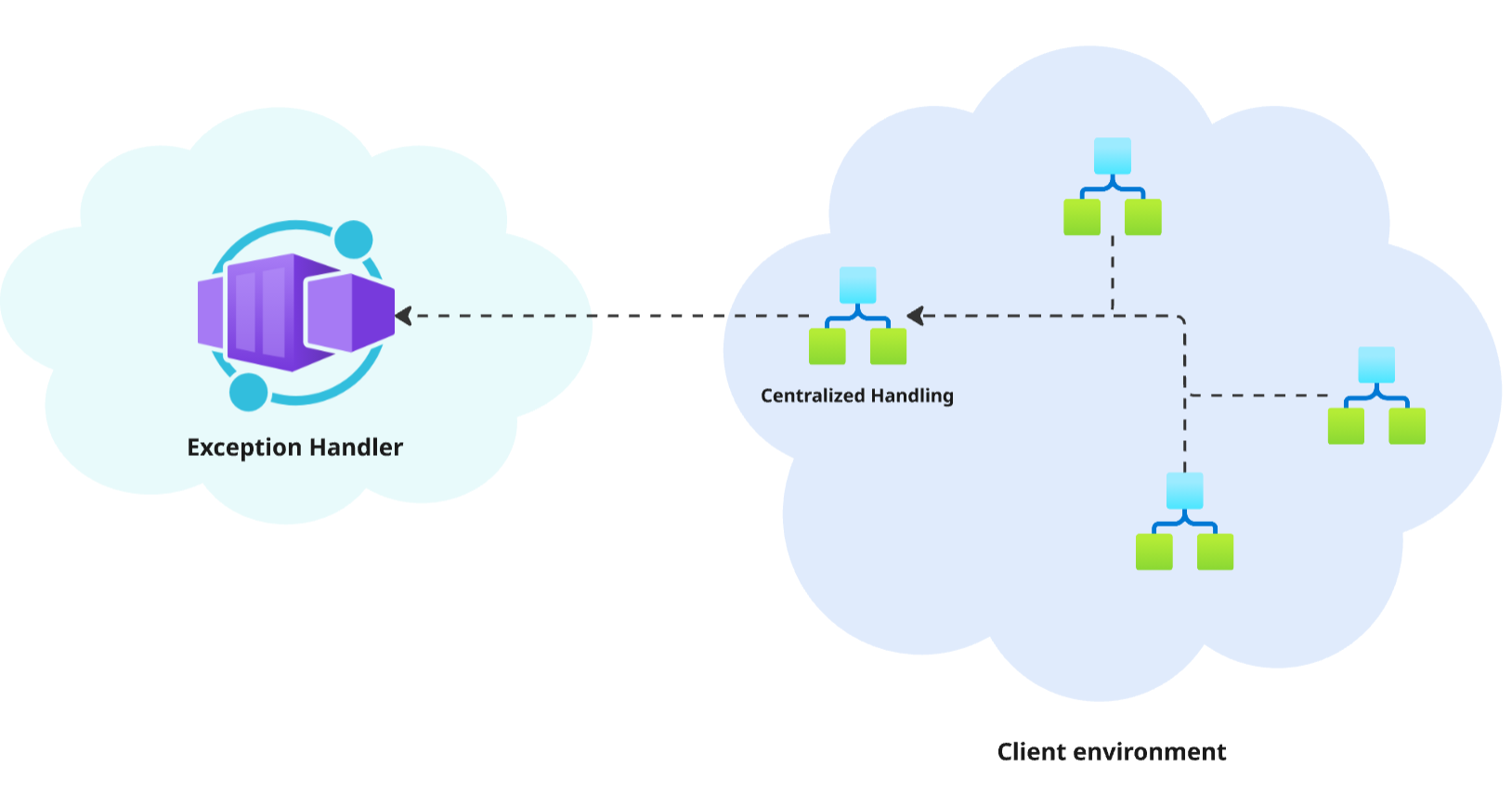
Logic Apps Exception Handling example
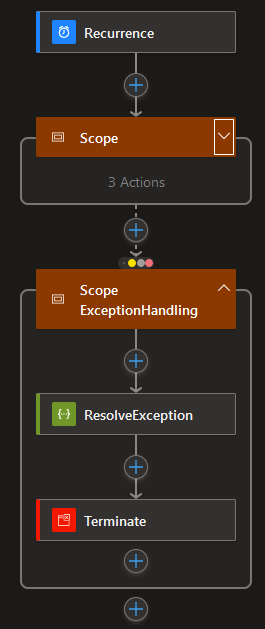
Take a look at the code for the Scope Exception Handling below. Pay attention to the Terminate action as this uses the information from the Exception Handler component and is nicely shown in the Invictus for Azure dashboard.

"Scope_ExceptionHandling": {
  "actions": {
	"ResolveException": {
	  "inputs": {
		"subscribe": {
		  "body": {
			"callbackurl": "@{listCallbackUrl()}",
			"logicApp": "@{workflow().name}",
			"resourceGroup": "@{parameters('resourceGroupName')}",
			"run": "@{workflow()['run']['name']}",
			"subscription": "@{parameters('subscriptionId')}",
			"correlationId": "@trigger().clientTrackingId"
		  },
		  "method": "POST",
		  "uri": "[listCallbackUrl(resourceId(variables('exceptionHandlerResourceGroupName'), 'Microsoft.Logic/workflows/triggers', variables('exceptionHandlerLogicAppName'), 'manual'), providers('Microsoft.Logic', 'workflows').apiVersions[0]).value]"
		},
		"unsubscribe": {}
	  },
	  "runAfter": {},
	  "type": "HttpWebhook"
	},
	"Terminate": {
	  "inputs": {
		"runError": {
		  "code": "@{if(equals(body('ResolveException').Status, 'Failed'), body('ResolveException').code, null)}",
		  "message": "@{if(equals(body('ResolveException').Status, 'Failed'), body('ResolveException').description, null)}"
		},
		"runStatus": "@{body('ResolveException').Status}"
	  },
	  "runAfter": {
		"ResolveException": [
		  "Succeeded"
		]
	  },
	  "type": "Terminate"
	}
  },
  "runAfter": {
	"Scope": [
	  "Failed",
	  "Skipped",
	  "TimedOut"
	]
  },
  "type": "Scope"
}
Customization
Affected Bicep parameters
The following Bicep parameters control the inner workings of the Exception Handler component. See the release pipeline step of the deployment of the Invictus Framework to learn more.
| Bicep parameter | Default | Description |
|---|---|---|
exceptionHandlerScaling | { cpuResources: '0.5', memoryResources: '1.0Gi', scaleMaxReplicas: 1, scaleMinReplicas: 0, concurrentRequests: 10 } | The Container App options to control scaling. See scaling rules in Azure Container Apps. |
exceptionHandlerFunctionName | inv-${resourcePrefix}-exceptionhandler | The name of the Azure Container App for the Exception Handler component. |