Run Logic App workflows in sequence by timestamps with the Time Sequencer
At the time of writing, there is no built-in way in Azure Logic Apps to 'control' the sequence in which workflow runs are executing. In certain scenarios, even though a workflow triggers before another, you want the first one to wait for the second. A common example is entity updates, where you don't want older updates to override newer ones - even though the workflow with the older updates 'happened after' the newer ones.
Time Sequencer is a Framework component that allows you by interacting with HTTP endpoints to set up sequences, controlled by custom timestamps, to ensure that workflows run in a time-controlled fashion. The component stores the sequence information in an Azure Blob Storage container, called invictustimesequencer.
Available endpoints
/api/WaitForExecution: by sending a request, it allows the currently running Azure Logic App workflow to possibly 'halt' its execution until their time to run actions./api/CompleteExecution: by sending a request, it flags the currently running Azure Logic App workflow as 'completed', so that the next workflow run can continue to run.
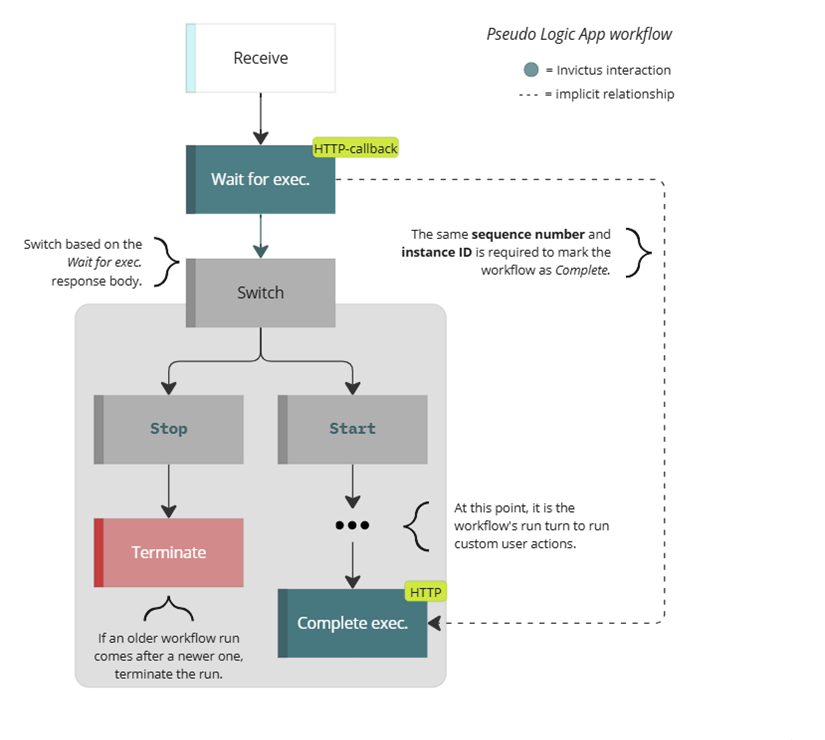
Workflows will process in sequence after the Wait. The place between the Wait and Complete task allows you to place your own logic that needs to run in order. If workflow 1 uses a custom timestamp that happened 'earlier' than the one used in workflow 2, the second workflow will wait for the first workflow.

⌛ Wait for execution
By using an Azure Logic Apps HTTP webhook to send a HTTP POST request to /api/WaitForExecution endpoint, the Time Sequencer component can queue a workflow run signal the run when it can continue. Determine the order of workflow runs by passing a custom Timestamp with the request body.
| JSON property | Required | Description |
|---|---|---|
SequenceName | yes | Transactional name of 'sequence' to group all Azure Logic App workflow runs that need to be run in sequence (same across workflow runs). |
InstanceId | yes | Unique operational ID within the 'sequence' of a single Azure Logic App workflow run (unique for each workflow run). |
Timestamp | yes | Date time to control the order of the Azure Logic App workflows in the 'sequence'. |
CallbackUri | yes | Should be supplied by the HTTP WebHook Azure Logic App action: @{listCallbackUrl()}. |
☑️ Complete execution
When the Wait for exec. operation responds with Start, then any custom user actions in the Azure Logic App workflow can be executed. Once those are done, the workflow should signal the Time Sequencer component, so that any waiting workflows can continue their execution.
Signaling completion happens with a HTTP POST request to the /api/CompleteExecution endpoint, using following required request parameters in the request body:
| JSON property | Required | Description |
|---|---|---|
SequenceName | yes | Transactional name of 'sequence' to group all Azure Logic App workflow runs that require sequencing (same across workflow runs). |
InstanceId | yes | Unique operational ID within the 'sequence' of a single Azure Logic App workflow run (unique for each workflow run). |
Customization
The Time Sequencer component stores the Azure Logic App workflow 'sequences' in an Azure Blob Storage container, called invictustimesequencer. The following policy rules are currently hardcoded on the Azure Storage Account in regards of cleaning these sequences:
- Move to cool storage: greater than
10 daysafter modification. - Delete the blob: greater than
60 daysafter modification. - Delete blob snapshot: greater than
90 daysafter creation.
Related Bicep parameters
The following Bicep parameters control the inner workings of the Time Sequencer component. See the release pipeline step of the deployment of the Invictus Framework to learn more.
| Bicep parameter | Default | Description |
|---|---|---|
storageAccountName | invictus{resourcePrefix}store | The name of the Azure Storage Account (used by other Framework components as well) that has the invictustimesequencer Azure Blob Storage container that stores the Azure Logic App workflow sequences. |
timeSequencerScaling | { cpuResources: '0.5', memoryResources: '1.0Gi', scaleMaxReplicas: 1, scaleMinReplicas: 0, concurrentRequests: 10 } | The Container App options to control scaling. See scaling rules in Azure Container Apps. |
timesequencerFunctionName | inv-${resourcePrefix}-timesequencer | The name of the Azure Container App for the Time Sequencer component. |